

• Print account

  • Students (uabcd account) can use the SCC printing services after topping up their printing account. An encrypted account statement can be requested and printed out.
    KIT employees (account ab1234) can use the printing services without restriction. Any costs incurred are billed monthly to the respective KIT institution.
    ★ Short address: scc.kit.edu/myprintundplot → Account


P&P News

16.03.26: Changes to web smart addresses/URLs

To ensure consistency in the English translation of our website, some short URLs containing English words have been reassigned for the English pages, and the German short URLs have been adjusted accordingly ("my" → "mein", etc.). We appreciate your understanding.
WORK IN PROGRESS(!), but please don’t hesitate to let us know if you notice any errors—thank you very much!


19.12.25: UPDATE: Users of Affinity Designer

The cause of the error has been identified and the problem has been resolved. We can once again recommend the use of our large format printers without reservation!
 

25.11.2025: It has repeatedly been found that posters created with Affinity Designer and then exported to PDF format are printed in unsatisfactory quality on our large-format printers.
A typical error is the printing of double (parallel) lines in vector objects, but sometimes also in embedded bitmaps in posters with strong graphic content (architecture posters).


06.11.25: Redesign of the Print & Plot websites: my Print & Plot

This week, the Print & Plot websites are being reorganized. With the introduction of my Print & Plot (★ scc.kit.edu/myprintandplot), you will soon be able to access all personalized services (print account inquiry, print job status, webPRINT) on a single website with just one login. You can switch between functions using tabs.


Please use the “Logout” function in the top right corner when you leave my Print & Plot.


As part of the changeover, all other websites related to P&P that were previously managed separately will also be gradually restructured or consolidated and will then be found in the “FAQ / Help” section.
 

-->


-->


Authorization to print

Students (KIT account type uabcd): After topping up the P&P printing account (see below), the printing service can be used immediately.

KIT employees (KIT account type ab1234): Unrestricted, immediate use of the P&P printing services.

"Guests & partners" (KIT account type ab1234): In consultation with the management of the host institution and subsequent activation by the ITB.


-->


Billing

Billing is automated and cashless! The production price is only calculated after bundling (combining all of a user's print jobs with identical print criteria within a 12-minute interval). Bundled jobs can no longer be unbundled; the job can only be printed or deleted as a whole.

KIT employees, "guests & partners":
Costs incurred are automatically billed monthly to the KIT facility assigned to the user account placing the order. Billing via a WBS element is not possible as we cannot assign the user account to a WBS element. The cumulative negative amount and the line items in the "Account" tab of myPrint&Plot tab only list the consumptions!

Students must always have sufficient print credit for the bundled order!
If there is insufficient credit, the ...

  • User informed by e-mail(OWA access to e-mail account)
  • Job parked in the account queue for 7 days (status held by accounting / <user account> €), and the balance checked ¼ hourly. If there is sufficient credit, the order is automatically reactivated; sending the order again results in another printout!
  • Order automatically deleted after 7 days.

Print & Plot - Price list (★ scc.kit.edu/pp-prices)


P&P print account terminal

The deposit is only required for students (query my current P&P printing account balance via short address ★: scc.kit.edu/myprintandplot#account). The account is topped up with the KIT Card in two steps:

  1. Loading the KIT Card...
    • Mathematics building 20.30: The recharging terminal closest to the SCC only works with bank cards!
      Opening hours: Mon. - Fri.: 7:30 a.m. - 7:30 p.m.
    • Mensa - [pizza]werk: At the entrance to the pizza counter in the Mensa am Adenauerring there are two terminals for recharging the KIT-Card with cash or bank card/cash.
      Opening hours of the Mensa foyer: Mon. - Fri.: 11:00 - 14:00
    • Mensa- Cafeteria: In the cafeteria of the Mensa am Adenauerring there is another combination terminal.
      The KIT-Card can also be topped up there at the cash desk if the "autoload" procedure (direct debit authorization for the SEPA direct debit procedure) has been activated for the KIT-Card.
      Opening hours of the cafeteria: Mon. - Thurs.: 7:30 - 19:30, Fri.: 7:30 - 16:00.
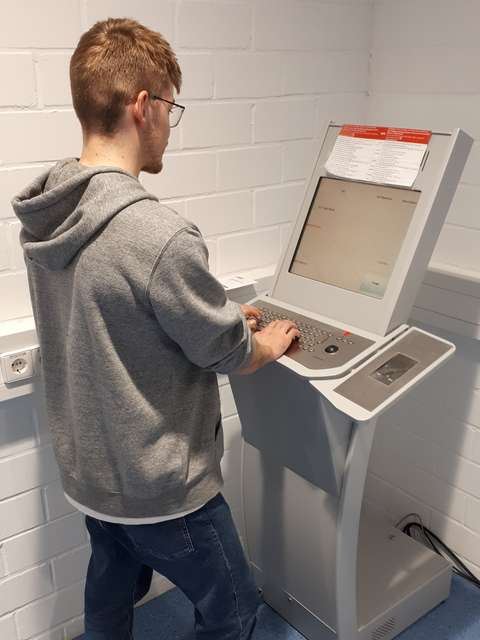
  2. Top up the P&P print account at the terminal in the basement of SCC-Süd, Building 20.20, R. -151.1 with an amount of money from the KIT Card.
    -->

    Please note:
    It is currently not possible to top up the P&P print account at the terminal in the print issue area via self-service. Please contact the P&P staff at the P&P helpdesk in the print issue!

    --> --> -->

Incorrect bookings / other problems

  • In the event of incorrect bookings, please write directly to ✉ druckkontoXvx6∂scckit edu. Please provide the following data:
    • Surname, first name
    • User code (uabcd)
    • Date and time of the incorrect booking
    • Wallet ID*
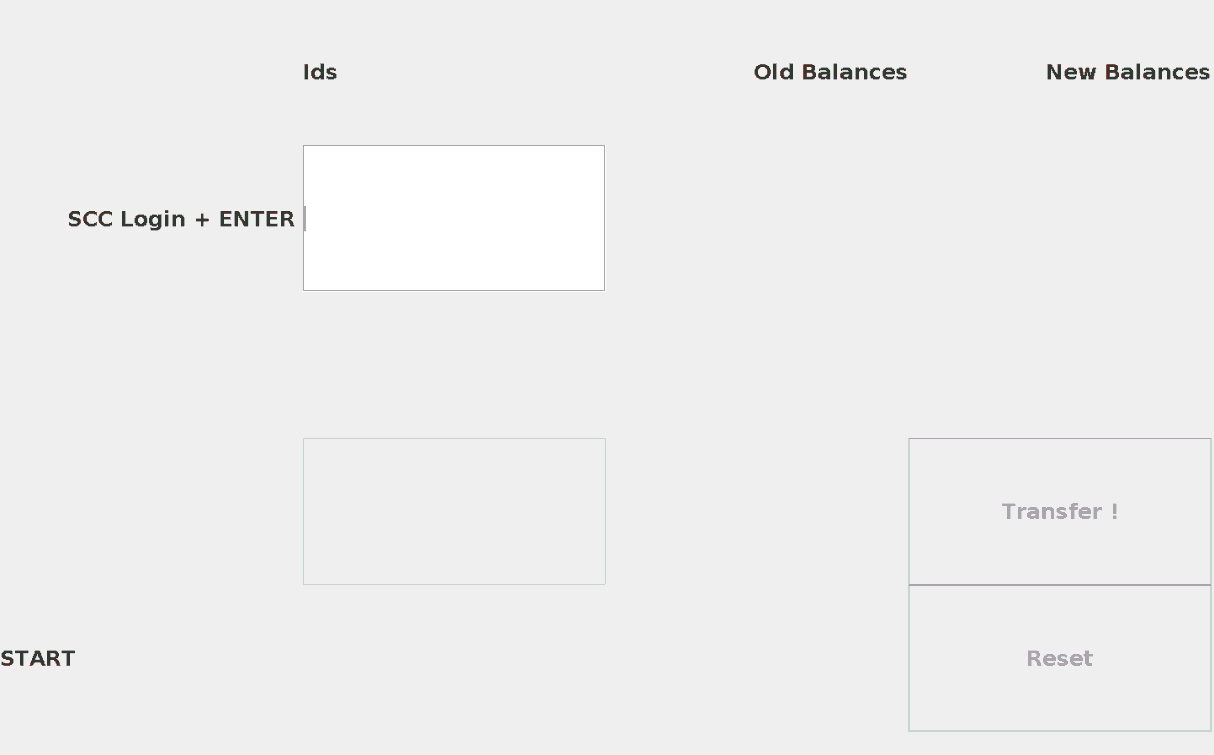
      * You can display the wallet ID on the terminal. Then end your session again with "Reset"!
  • If you have any other problems, please contact the P&P HelpDesk in the Print Edition (R. -151.1).
P&P-Druckkontoterminal - Benutzeroberfläche

P&P print account terminal - user interface


-->


Tax return - students only

If you would like to report your printing expenses on your tax return, you should use the encrypted my Print & Plot print account query to regularly print out a statement at the end of the semester showing your current printing balance and consumption for the previous semester using the browser's print function.

Note: Please note that the currently possible query back to 2016 can be switched back to a semester-by-semester statement at short notice. The data then moved to an archive can only be restored at great expense of time, which we are not able to do in terms of personnel.


Payment (de-registration) - students only

The print account can be closed by submitting an application to Print & Plot when exmatriculating. The remaining balance will then be transferred back to the user's bank account by the Studierendenwerk.

Important: Your user account (uabcd) will be deleted six months after exmatriculation. You can only have the credit from your P&P print account paid out during this time. After this time, it will no longer be possible to trace the allocation to the person↔user account and payment will no longer be possible!

The request can be made at the Print & Plot Helpdesk(room -151.1) or by e-mail to druckkontoXvx6∂scckit edu. An identity card (e-mail: double-sided scan of the identity card) and the following data are required:

  • KIT user account/user code ("uabcd")
  • IBAN
  • BIC/SWIFT
  • Bank name
  • Private e-mail address