

-
M365 - Account and Licenses
- At KIT, user accounts in M365 are provided for employees, students, guests and partners at KIT to use various licensed and enabled Microsoft Cloud services and M365 applications.
- Contact:servicedesk@scc.kit.edu
- Advisory services:Jörg KramerKerstin Schmidt
- Info:
- Links:
General information
KIT provides KIT members with Microsoft Cloud M365 accounts and M365 licenses for using various applications in the Microsoft Cloud.
Account & Licenses
sprungmarken_marker_19049
M365 Account
The M365 accounts at KIT are the user accounts that are provided in the Entra ID directory service of the Microsoft Cloud.
The status of an M365 account depends on the status of the KIT account. The settings and validity of the M365 accounts, as well as assigned licenses or authentication, are made via KIT local systems, such as
- Identity Management System (IDM)
- KIT Active Directory
- Shibboleth Identity Provider
- Self Service Portal - my.scc.kit.edu
Why do you need an M365 account?
- To log in to Microsoft services
- To use Microsoft cloud services such as M365 Copilot Chat, Teams, OneDrive, etc.
- To use the M365 Office licenses for MS Word, Excel, PowerPoint, etc.
- For guest access in the Microsoft Cloud of external partner organizations
Which M365 accounts are provided?
The following M365 accounts are provided via the Entra ID directory service in the two KIT home organizations.
- Employees, as well as guests and partners (GuP) receive an M365 account in their home organization"KIT - Karlsruhe Institute of Technology"
- Students receive an M365 account in their home organization"student.kit.edu"
- Students also receive an M365 guest account with limited permissions in the home organization for employees and GuP"KIT - Karlsruhe Institute of Technology"
Note: This M365 guest account is used, for example, to participate in lectures held by lecturers in MS teams.Role Login name Home organization Employee ab1234 ∂does-not-exist.kit edu KIT - Karlsruhe Institute of Technology Guests & Partners (GuP) ba1234 ∂does-not-exist.partner kit edu KIT - Karlsruhe Institute of Technology Students uxxxx ∂does-not-exist.student kit edu student.kit.edu
Note: You can obtain up-to-date information about your M365 account at myaccount.microsoft.com.
When will I receive an M365 account?
- All employees, as well as guests & partners (GuP) at KIT, automatically receive an M365 account in Entra ID as soon as the KIT account has been activated in the Self Service Portal (delays possible).
- Students must agree to cloud use in the SCC Self-Service Portal and will then receive a valid M365 account in "student.kit.edu" and directly an associated M365 guest account in "Karlsruhe Institute of Technology". The basis of these M365 accounts is also the local user account valid at KIT (uxxxx).
How long is the M365 account valid?
-
Role Validity Comment Employee Validity of KIT account
(after portal activation)Licenses depending
on contract statusGuests & partners (GuP) Validity of GuP account
(after portal activation)Licenses restricted Students Validity of KIT account
(after approval of MS Cloud use)Licenses depending
on enrollment status
How do I log in with the M365 account?
Registration in the Microsoft Cloud is always done via the person's home organization ...
- by entering the login name (see table) in the Microsoft login window and
- forwarding to the KIT authentication service - Shibboleth IDP
This means that the authentication information remains at KIT and is not transmitted to Microsoft.
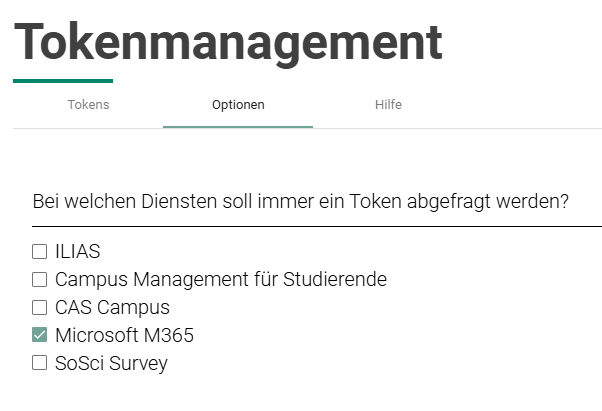
When logging in to the Microsoft Cloud, two-factor authentication (2FA) is mandatory for employees, students and GuP .
- The 2FA must be set up once in the token administration in the SCC Self-Service Portal for the KIT account.
(KIT - SCC - Self-Service Portal - Home - Login - Token management). - For students using a device running macOS, iOS or Android, we recommend setting up a smartphone token (Passkey does not work here!)
Licenses for the M365 Account
What licenses does an M365 account have?
- The Microsoft 365 Education licensing program bundles both cloud-based and locally installable Microsoft products in various licensing plans (A1, A3, A5). KIT is licensed for Microsoft 365 A3 via the EES contract.
- M365 licenses are assigned to M365 accounts at KIT by default and are dependent on a person's role. This allows employees, students, guests and partners (*GuP) to use approved services and applications.
- If extended licenses are required, these must be applied for and the costs must be borne by the requesting organizational unit. Please contact the IT representative of your OU.
- Certain agreements and guidelines also apply to the activation of additional applications.
Important: An account renewal does not change the contract status of a person at KIT! Assigned licenses and/or access authorizations are therefore no longer valid after a person leaves or exmatriculates. Accordingly, replacement licenses must be obtained from the person'sorganizational unit at KIT (OU) responsible for the person.
(*GuP) Guests & Partners do not get a licence for Microsoft 365 Apps for Enterprise (Office 365 Desktop)